



How SuSocialPro Works: A Simple Guide to Social Media Automation
If you are new to SuSocialPro, the software may look a little complicated at first.
You may see different task types, multiple accounts, content files, URLs, AI tools, scraping tools, and many settings.
But the basic idea is actually very simple.
SuSocialPro helps you put accounts, content, and target URLs together and turn them into an automated task.
Once you understand this basic idea, most of the features become much easier to understand.
The Basic Idea Behind SuSocialPro
Think about a normal social media task.
You usually need three things:
- Accounts — Which accounts will perform the action?
- Content — What should the accounts post, comment, or use?
- Targets — Which posts, pages, or URLs should the action be performed on?
SuSocialPro brings these things together.
For example, if you want to create a post task, you choose your accounts and prepare your post content.
If you want to create a comment task, you choose your accounts, prepare your comments, and provide the post URLs.
Other task types follow the same basic idea.
The action may be different, but the workflow is often very similar.
Where Does the Content Come From?
One of the first things you need for many tasks is content.
You have several ways to prepare it.
Use Your Own Text
If you already have your own content, you can prepare it in a text file and import it into the task.
For example, you may have a text file containing multiple posts:
Post 1 Post 2 Post 3 Post 4Or you may have a list of comments:
Comment 1 Comment 2 Comment 3 Comment 4You prepare the content once and then use it in your task.
Let AI Generate the Content
You do not always need to write everything yourself.
If you need a large amount of content, you can also use AI to generate text.
For example, instead of manually writing dozens of comments, you can provide your requirements and let AI help generate the content.
This is especially useful when you need different variations of similar content.
So, in simple terms:
You can provide the text yourself, or let AI help create it.
Where Do the Target URLs Come From?
Some tasks also need URLs.
For example, you may want to perform an action on a list of social media posts.
You could manually collect those URLs, but that can take a lot of time when you have many targets.
This is where the built-in scraping tools can help.
SuSocialPro includes scraping features that can collect relevant results for you.
You can then use those results as the input for another task.
So the workflow can look like this:
Scrape → Get Results → Use Results in a Task
This is an important part of the SuSocialPro workflow.
You do not always have to manually prepare every URL before creating a task.
A Simple Example: Post Task
Let's use a Post Task as an example.
Imagine you have several social media accounts and want them to publish different pieces of content.
The workflow is simple:
Choose accounts → Prepare content → Create task → Run task
When preparing the content, you can either:
- Import your own text file
- Generate content with AI
You don't need to manually create every post one by one inside the software.
The task uses the content you provide according to your settings.
Another Example: Comment Task
Now let's look at a Comment Task.
Suppose you have several accounts and want them to comment on a list of social media posts.
You need:
Accounts + Comments + Post URLs
First, select the accounts.
Then prepare your comments. You can import a text file or generate comments with AI.
Next, provide the post URLs.
You can import the URLs yourself, or use results collected by the built-in scraping tools.
Then you can configure how the accounts, comments, and URLs should be used.
After that, the task is ready to run.
The important thing is that the basic workflow is still the same:
Choose → Prepare → Configure → Run
What About Likes and Other Tasks?
This is where you can start to see the bigger picture.
Post and Comment are only two examples.
SuSocialPro supports different types of social media tasks, and you do not need to learn every task separately from scratch.
The exact input may be different, but the general workflow is similar.
You usually start by selecting the accounts you want to use.
Then you provide the information the task needs.
That information may be:
- Text
- URLs
- Posts
- Pages
- Other target information
For text-based tasks, you can use your own content or AI-generated content.
For tasks that need target URLs, you can provide your own URLs or use results collected by the built-in scraping tools.
Then you configure the task and let SuSocialPro handle the work.
You Can Also Control How Things Are Reused
Another useful part of task creation is controlling how often different items are used.
For example, you may have:
- 10 accounts
- 20 pieces of content
- 100 target URLs
You may not want everything to be used only once.
Depending on the task, you can configure usage rules for things such as:
- How many times an account can be used
- How many times a piece of content can be used
- How many times a target URL can be used
This gives you more control over how the task works.
Instead of simply saying, "Use everything once," you can decide how your accounts, content, and targets should be distributed.
The SuSocialPro Workflow in One Picture
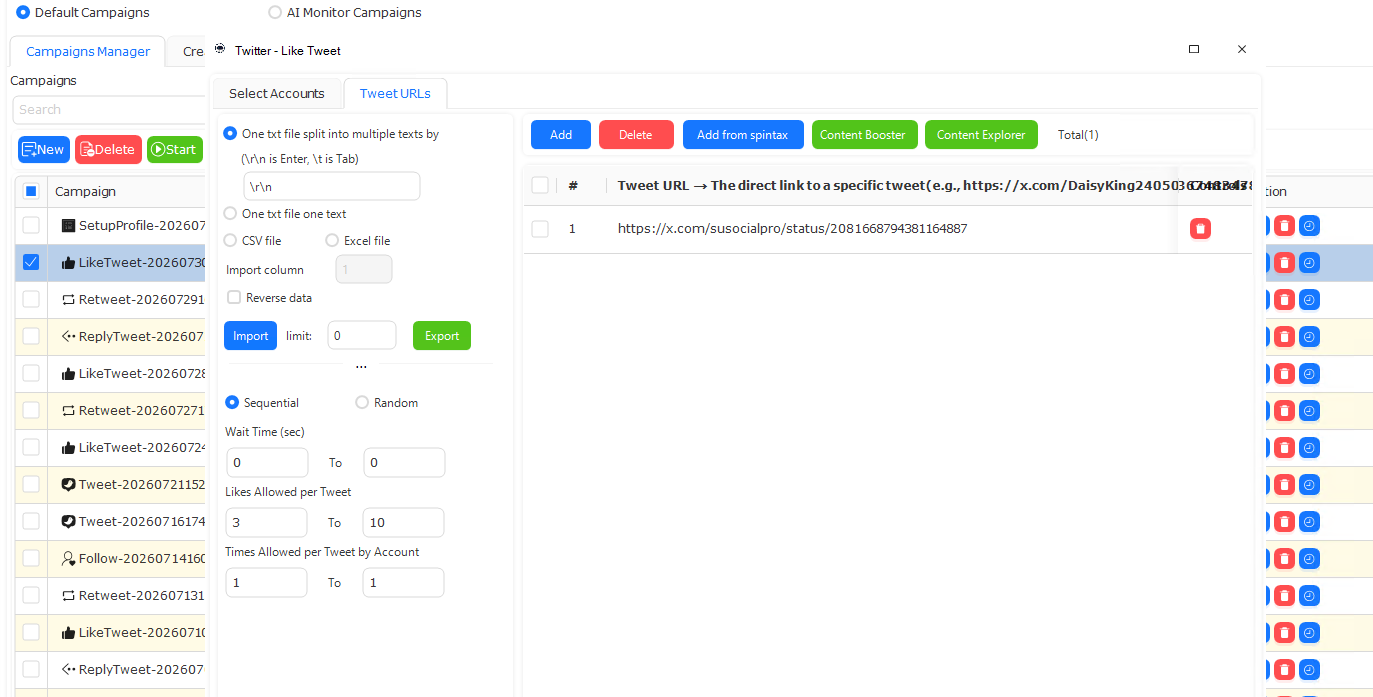
If all of this still sounds complicated, forget the feature names for a moment.
Just remember this:
1. Choose your accounts
Who will perform the task?
2. Prepare your content
Use your own text, import a text file, or generate content with AI when supported.
3. Prepare your targets
Provide the URLs or other target information required by the task. You can also use results from SuSocialPro's built-in scraping tools when applicable.
4. Configure the task
Decide how the accounts, content, and targets should be used.
5. Run the task
SuSocialPro takes care of the repetitive work according to your settings.
That's the basic idea.
SuSocialPro Is More Than Just a List of Features
When people first look at automation software, they often focus on the number of features.
But the more useful question is:
"What do I need to give the software, and what will it do with that information?"
For SuSocialPro, the answer is relatively simple.
You provide the accounts.
You provide the content.
You provide the target information when the task needs it.
You decide how these things should be used.
Then SuSocialPro turns them into a task.
Once you understand this workflow, it becomes much easier to explore different task types and features.
Start With the Task, Not the Feature
You don't need to learn every SuSocialPro feature before using the software.
Instead, start with what you want to accomplish.
Do you want to publish content?
Create a Post Task.
Do you want to work with comments?
Create a Comment Task.
Do you need target URLs?
Import them or collect them with the built-in scraping tools.
Do you need more content?
Prepare your own text or use AI to generate it.
The exact task may change, but the basic thinking stays the same:
Accounts + Content + Targets + Settings = Your Automation Task
That is probably the easiest way to understand how SuSocialPro works.