



PVACreator – Gmail Bypass QR Code Version Important Usage Notes
Please read the following instructions carefully before using the Gmail Bypass QR Code version.
1. Bind Fingerprint to both Proxy and Browser
You must bind fingerprints to both the proxy and the browser.
Operation video tutorial:
https://www.youtube.com/watch?v=QOkIewoWX7w
Please pay special attention to two important points in the video:
- 0:29
- 3:10
These steps are very important for reducing the chance of triggering the QR code verification.
2. Gmail Bypass QR Code Version – Our Proxy Testing Experience
This information is for reference only.
It does NOT mean that buying proxies from these countries will guarantee that the QR code will not appear.
Countries where proxies did NOT trigger the QR code during registration:
- Turkey
- Brazil
- Singapore
- Argentina
- Malaysia
Countries where we STILL encountered the QR code even when using proxies:
- South Korea
- United States
- India
- Indonesia
- Hong Kong
- Poland
Proxy quality is very important.
Even in good countries, low-quality proxies may still trigger QR code verification.
We hope these testing tips and observations can be helpful for you.
The country where the proxy is located may have some influence on whether a QR code verification is triggered, but it is not the only factor. More importantly, Google evaluates whether the proxy itself is trusted, clean, and has a good reputation. A high-quality proxy with a reliable IP history is usually more important than the proxy location alone.
3. Phone Country Field
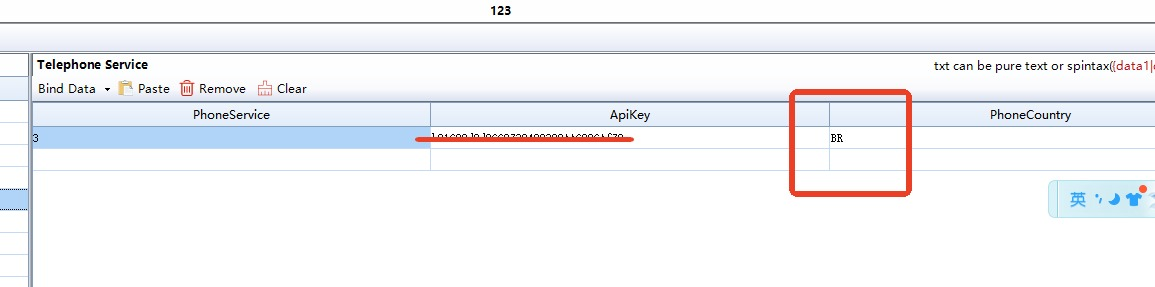
In the “Phone Country” field, please enter the country abbreviation, not the full country name.
Examples:
- Brazil → BR
- United States → US
- Singapore → SG
This is NOT related to which SMS service you are using.
In the QR Code version, the “Phone Country” field should always be the country abbreviation.
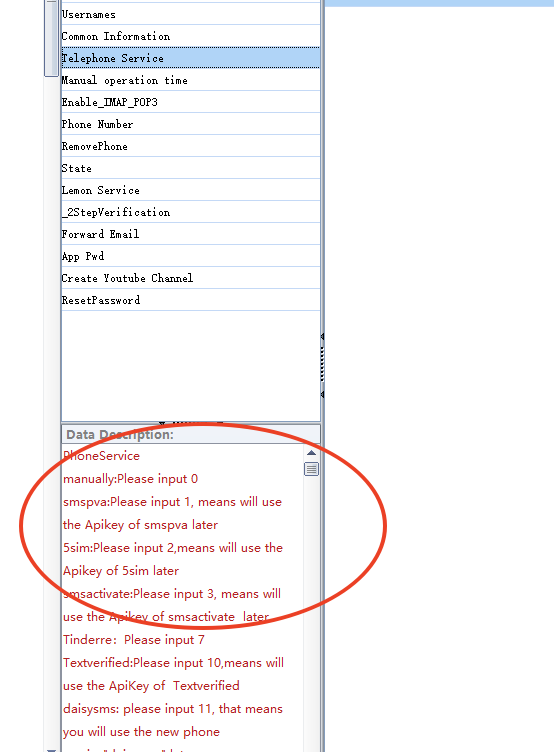
For the phone service, please check the software data description for the correct format.
Need Help?
If you still have any problems, please contact:
WhatsApp / Telegram: +86 193 3223 6974