



PVAcreator Error: “The specified file cannot be found” — How to Fix It
When you run a campaign in PVAcreator and click Run, you may see this error message:
“The specified file cannot be found”
Why this happens
This issue usually occurs because Shark Browser is not installed on your computer.
PVAcreator requires Shark Browser to run campaigns properly.
How to solve it
✅ Solution 1 (Recommended)
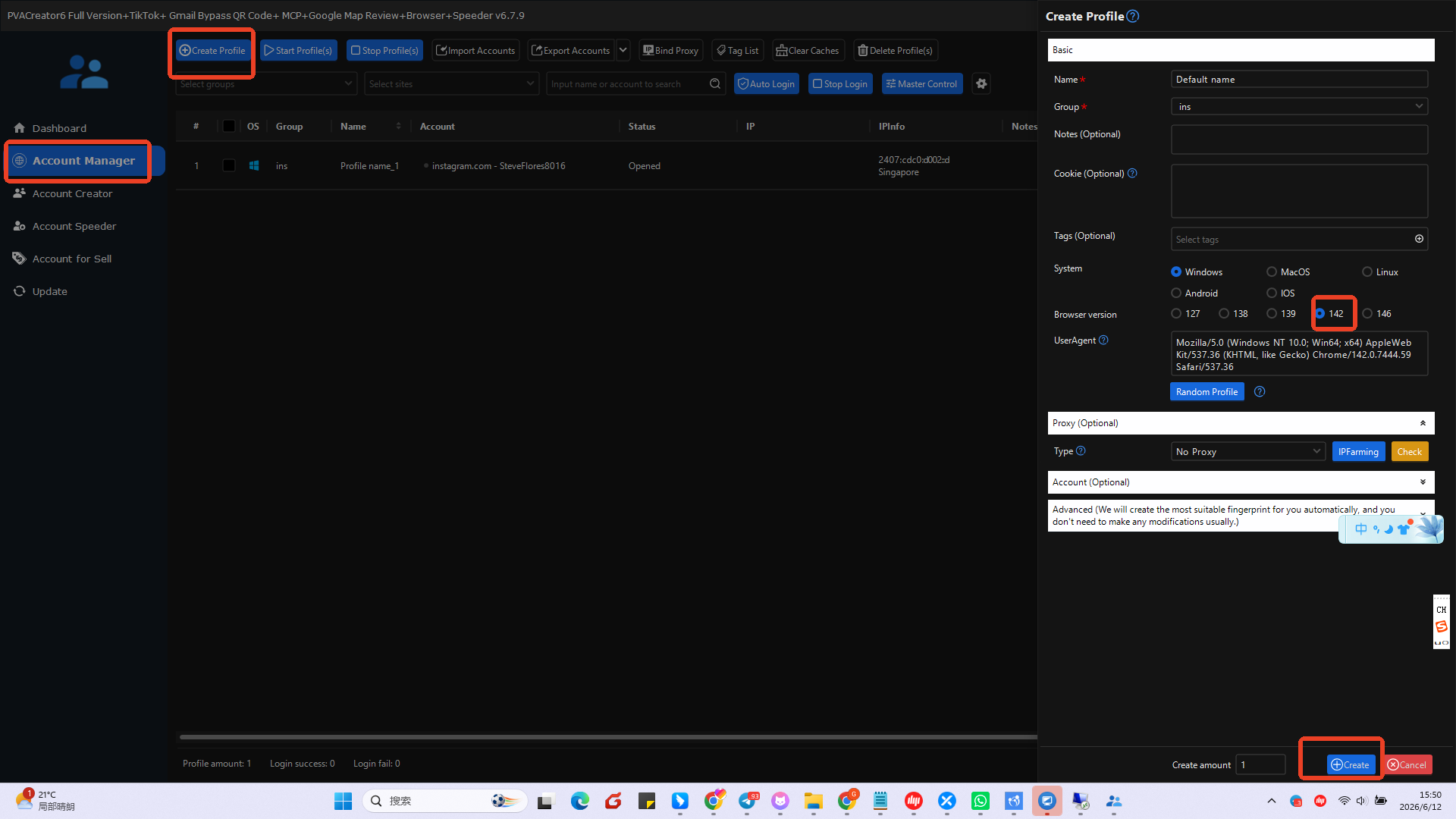
If your license includes the Account Manager module, follow these steps:
- Switch to the Account Manager tab
- Click Create Profile
- In the browser settings, choose Browser Version 142
- Click Create
After that, the software will automatically start downloading Shark Browser.
👉 Wait until the download is fully completed
👉 Then restart PVAcreator
The problem should be fixed after restart.
✅ Solution 2
If your license does NOT include Account Manager, do this:
- Close PVAcreator completely
- Reopen the software
- Wait for a few minutes to see if it automatically downloads Shark Browser
In most cases, the software will download it automatically.
If it does not download, please contact support for help.
Need help?
If you still face issues, contact us:
WhatsApp: +86 193 3223 6974
Telegram: @spinnerchief